
Varnish Cache for Varnish Cache Deployment for ISPConfig 3 with Nginx SSL Termination
Not every slow website can be fixed by installing another plugin. Sometimes the problem sits lower in the stack: in the way traffic moves between the web server, SSL termination, the cache layer and the application itself.
This project was created as an extension to an ISPConfig 3 environment running WordPress and Craft CMS websites. Its purpose was to organise the request flow and place Varnish Cache in front of Apache.
Context and problem
Without an additional cache layer, every request may reach Apache, PHP, the database and the CMS directly. This means that the application generates the same response again even when the page has not changed since the previous request.
Varnish can keep a completed response in memory and return it without starting the entire backend process again. This reduces the number of requests handled by Apache and the application, but it requires proper integration with HTTPS, cache invalidation and ISPConfig.
The task was therefore not limited to starting Varnish. The configuration had to remain predictable, updateable and compatible with the existing server environment.
My role
I designed the traffic-flow architecture and prepared the Nginx, Varnish and Apache configuration, including custom host templates used by ISPConfig 3.
I was also responsible for server deployments, integration of cache-purging mechanisms and adjustments required by WordPress and Craft CMS websites.
The code was released publicly so that the configuration could be deployed and updated without manually recreating every change on each server.
HTTPS traffic architecture
For HTTPS traffic, each request passes through several separate layers:
Internet
→ Nginx SSL Termination :443
→ Varnish Cache localhost:7443
→ Apache
→ WordPress or Craft CMS
Nginx handles the HTTPS connection and SSL termination. It then forwards the request to Varnish, which checks whether the response can be returned from memory.
When a suitable cached response is available, Varnish returns it without starting the application. When the response is missing or the request should not be cached, traffic continues to Apache, PHP and the CMS.
The non-SSL path is shorter:
Internet
→ Varnish Cache :80
→ Apache
→ WordPress or Craft CMS
Each layer has a specific responsibility. Nginx handles HTTPS and compression, Varnish manages the cache, Apache serves the application, and WordPress or Craft CMS generates the content.
Project scope
- integration of Varnish Cache with ISPConfig 3,
- Nginx configuration for SSL termination,
- Apache configuration as the application backend,
- support for WordPress and Craft CMS websites,
- automatic cache invalidation after content changes,
- integration with WP Rocket and Proxy Cache Purge,
- integration with CDN Cache & Preload for Craft CMS,
- support for environments using Cloudflare,
- Gzip and Brotli compression handled by Nginx,
- custom ISPConfig 3 host templates.
Cache invalidation after content changes
A cache improves performance only when it can be invalidated correctly.
After content is published or edited, an outdated response should not remain in Varnish until someone removes it manually. The configuration was therefore connected to cache-purging mechanisms available in WordPress and Craft CMS.
Depending on the application, the environment can use WP Rocket, Proxy Cache Purge or CDN Cache & Preload. This allows cached responses to be refreshed after a content change without clearing the entire environment after every update.
Why this configuration matters
Website performance is not limited to a score from a single test. Server behaviour under higher traffic, correct HTTPS handling, predictable cache invalidation and the ability to maintain the environment also matter.
Varnish was not added here as an isolated service. It was connected to Nginx, Apache, ISPConfig, the application and the content-update workflow.
This avoids relying on a single manual workaround that stops working after a host configuration or control-panel update.
Testing and verification
The configuration should be checked at several levels:
- whether the first request reaches the backend,
- whether subsequent requests are returned from Varnish Cache,
- whether administration panels and authenticated sessions bypass the cache,
- whether content changes invalidate outdated responses,
- whether HTTPS is handled correctly by Nginx,
- whether headers are passed correctly between the layers,
- whether Cloudflare retains an outdated response after the Varnish cache has been purged.
Basic diagnostics can be performed by inspecting HTTP headers:
curl -I https://example.com/Depending on the configuration, useful headers may include:
Age
Cache-Control
Via
X-Cache
X-Cache-Hits
The exact header names depend on the VCL and Nginx configuration.
Limitations and requirements
Varnish does not solve every performance problem.
When a website is slowed down by expensive database queries, PHP errors, external APIs or browser-side scripts, caching may reduce part of the load but will not remove the original cause.
The environment also requires correct rules for dynamic content, authenticated users, administration panels and pages that depend on cookies. Incorrect settings may result in outdated or inappropriate content being served.
Traffic-flow diagram
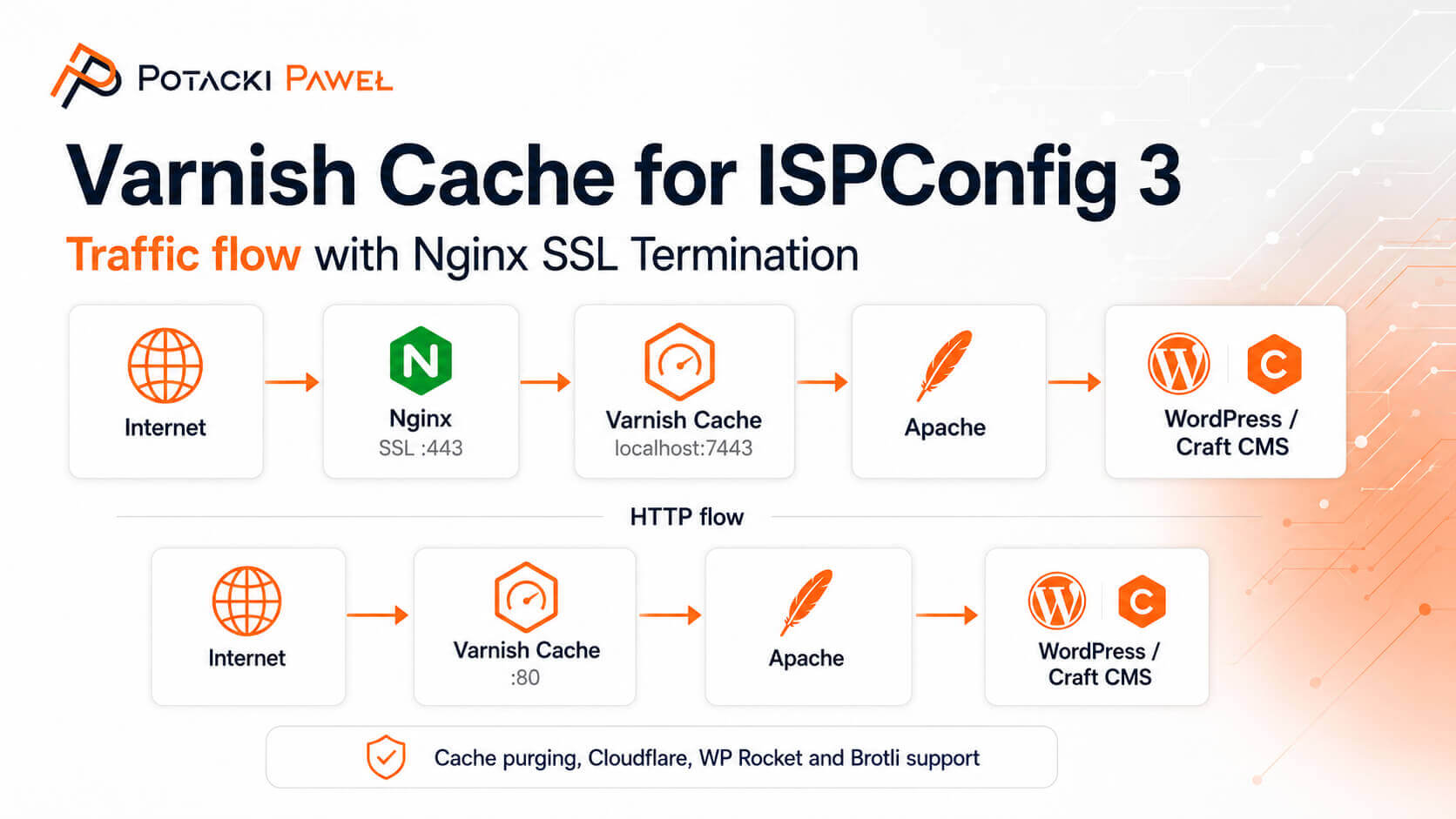
Image description: HTTPS traffic flow in an ISPConfig 3 environment: Internet → Nginx SSL → Varnish Cache → Apache → WordPress or Craft CMS.
Technologies
ISPConfig 3, Debian Linux, Nginx, Varnish Cache, Apache, WordPress, Craft CMS, Cloudflare, WP Rocket, Gzip and Brotli.
Open-source repository
The project code and deployment instructions are publicly available on GitHub:
View the Varnish Cache for ISPConfig 3 repository
Website and server performance diagnostics
When the problem cannot be reduced to a single plugin, I inspect the complete request path: application code, database queries, cache layers, integrations, PHP and server configuration.
Describe the current environment and the way the website behaves. This makes it possible to determine whether the bottleneck is located in the application, database, cache or server layer.