
Why Another Plugin Won’t Fix a Slow Website: Varnish Cache for ISPConfig 3 with Nginx SSL and Apache

A slow website does not always need another optimisation plugin. Sometimes the actual problem lies deeper: in the server configuration, the caching layer, or the way traffic flows between Nginx, Apache, and the application.
In one of my projects, I reorganised the architecture of an environment based on ISPConfig 3. The goal was to add Varnish Cache in front of Apache while keeping SSL termination in Nginx and ensuring proper support for websites built with WordPress and Craft CMS.
How the Traffic Flows
In practice, the request flow looks like this:
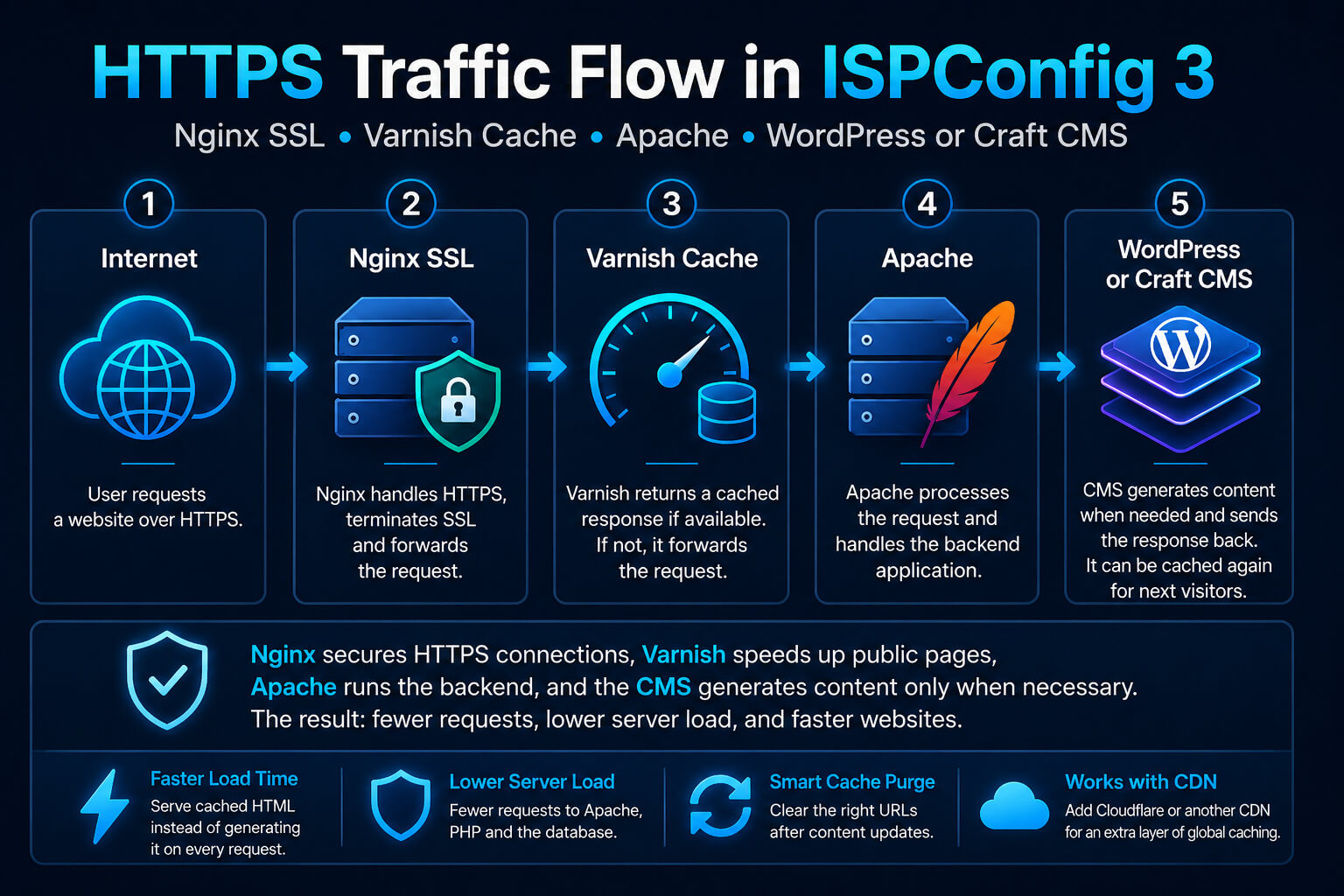
Image caption:
HTTPS traffic flow in an ISPConfig 3 environment: Internet → Nginx SSL → Varnish Cache → Apache → WordPress or Craft CMS.
Image description:
An infographic for a technical article on potacki.com. It shows a simple traffic flow in an architecture using Nginx, Varnish Cache, Apache, and an application based on WordPress or Craft CMS. Nginx handles HTTPS and forwards the request. Varnish returns a cached response when one is available. Apache handles the application backend, while the CMS generates the content if the response has not yet been stored in the cache.
Each layer has a different role.
Nginx Handles HTTPS
Nginx receives incoming HTTPS traffic, handles SSL termination, and forwards the request to the next layer. This means that Varnish does not need to manage SSL certificates directly.
Varnish Returns a Ready Response from the Cache
If a page has already been generated and can be safely cached, Varnish returns the ready response without launching the application.
In practice, this means fewer requests reaching Apache, PHP, and the database.
Apache Handles the Application Backend
If Varnish does not have a ready response yet, or if the page should not be cached, the request is forwarded to Apache.
Only then is the application backend launched.
WordPress or Craft CMS Generates the Content
WordPress or Craft CMS prepares the HTML response when it is not available in the cache yet or when the page needs to remain dynamic.
Once a public page has been generated, the response can be stored again and reused for subsequent visits.
Cache Preloading from the Sitemap and an Additional Cloudflare Layer
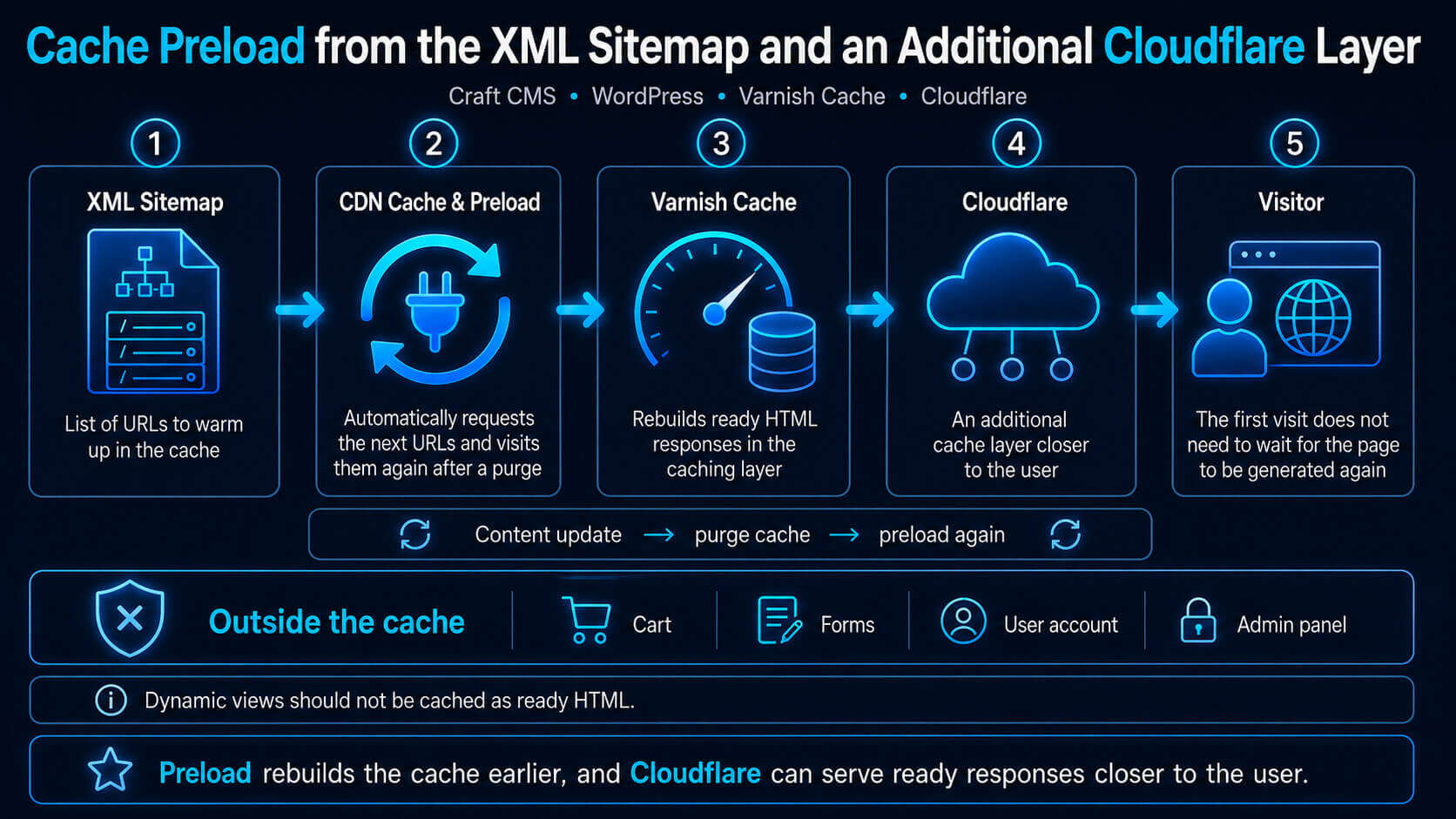
The CDN Cache & Preload plugin for Craft CMS can warm up the cache based on an XML sitemap. After the cache has been cleared, it requests consecutive URLs from the sitemap and rebuilds ready HTML responses in the caching layer.
This means that the first visitor opening a page does not need to wait for the application to generate the entire response again.
A similar preload mechanism is also available in popular WordPress solutions such as WP Rocket and FlyingPress. The principle is simple: instead of waiting for random visits from users, the system automatically goes through the most important URLs and prepares the cache in advance.
If Cloudflare is also running in front of the server, another caching layer can be added. This requires the right rules, however, because Cloudflare does not cache HTML pages by default.
Once configured correctly, ready responses can be served closer to the user, while some requests no longer need to reach the application, PHP, or the database.
This architecture handles both regular traffic and short spikes in load effectively. However, simply enabling several mechanisms is not enough.
The cache should speed up public pages, but it must not include areas that depend on user sessions, shopping carts, forms, or the administration panel.
You need to determine which URLs can be safely cached, when they should be refreshed, and how old versions should be removed after content changes.
View the CDN Cache & Preload plugin for Craft CMS, WordPress on GitHub
Common Cache Problems in Real-World Projects
Simply launching Varnish, Cloudflare, or a caching plugin does not mean that the architecture is working correctly.
Most problems appear when the individual layers do not know when to store a response, when to skip it, and when to remove an outdated version of a page.
Missing or Incorrect Purge After a Content Update
The first problem appears after editing a post, page, or product. If the cache is not purged correctly, visitors may still see an outdated version of the content.
In a simple environment, removing one cached version of a page may be enough. With several layers, the situation becomes more complex. The old response may still remain in Varnish, Cloudflare, or the application’s local cache.
This is why a purge should cover not only a single URL, but also related locations.
After updating a post, it is worth refreshing:
- the post page
- the category page
- the blog listing
- the homepage
- other views where the updated content appears
In more complex projects, it is better to think of purging as a process rather than a single command.
Caching Pages That Should Remain Dynamic
Not every page can be stored as ready HTML. Problems begin when the cache includes views that depend on a specific user.
This applies to areas such as:
- the shopping cart
- the checkout form
- the user account
- search results
- pages with personalised messages
- the administration panel
- URLs with GET parameters
If such a page is cached, a user may see data prepared for another session or an outdated version of their shopping cart.
Cache rules should therefore clearly separate public pages from dynamic areas.
A properly configured system does not try to cache everything. It stores only the content that can actually be shared safely between users.
Cookies: Disabling the Cache for Too Many Users
Cookies are another common source of problems. Many configurations bypass the cache as soon as a particular cookie appears in the request.
This makes sense for logged-in users or WooCommerce shopping carts. The problem begins when the cache is also disabled by analytics, marketing, or technical cookies that do not affect the content of the page.
As a result, Varnish starts forwarding a large proportion of traffic to Apache and PHP, even though users receive exactly the same content.
It is therefore worth checking which cookies genuinely require a cache bypass and which can be safely ignored.
The simpler and more deliberate the rules are, the more responses can be returned without putting unnecessary load on the backend.
Incorrect Cache-Control Headers
HTTP headers determine how long a response may be stored and who can use it.
Incorrect Cache-Control settings can completely disable caching or cause the opposite problem: allow content to be stored even though it should remain private.
The most important differences concern directives such as:
publicprivateno-cacheno-storemax-ages-maxage
For public pages, it is worth using rules that allow an intermediate caching layer to store the response.
For user accounts, shopping carts, and forms, much more cautious settings are required.
Using the same headers across the entire website is rarely a good approach. Separating public, private, and dynamic responses usually produces better results.
Unnecessary Requests Reaching Apache and PHP
The main benefit of Varnish is that a ready response can be returned without launching the application.
However, if the cache rules are too conservative or inconsistent, every request still reaches Apache, PHP, and the database.
The server then performs the same work repeatedly, even though the result could have been stored earlier.
It is worth monitoring how many responses result in a HIT and how many end as a MISS, PASS, or BYPASS.
HIT
The response was returned from the cache.
MISS
A ready cached version is not available, so the backend needs to generate it.
PASS or BYPASS
The cache was intentionally skipped.
Occasional cache bypasses are normal. The problem begins when most public traffic still reaches Apache and PHP.
Cache Behaviour Should Be Predictable
A properly configured cache is not about storing as many pages as possible.
Public pages should be returned quickly as ready HTML. Dynamic views must remain outside the cache. A content update should trigger a purge and a new preload of the most important URLs.
Cookies should not unnecessarily disable caching for anonymous visitors.
Only this approach genuinely reduces the number of requests reaching Apache, PHP, and the database.
How to Check Whether the Cache Is Actually Working
The simplest test is to compare several consecutive responses for the same URL.
The first visit may result in a MISS because the page is not yet available in the cache. Subsequent requests should return a HIT.
It is also worth monitoring the response time, HTTP headers, and Varnish logs.
A good result in a performance testing tool is not always enough. The cache should continue to work reliably after content updates, changes to CSS and JavaScript files, and visits from anonymous users with different cookies.
The best cache configuration is not the one that stores everything.
The best configuration is the one that knows what can be safely stored, when it should be removed, and how to reduce backend work without the risk of showing the wrong content to the user.
View Related Projects
View the case study: Varnish Cache for ISPConfig 3 with Nginx SSL Termination